Fixing Microsoft Edge PWA taskbar grouping on KDE Plasma and GNOME (Wayland)
A simple fix can make make Microsoft edge PWA launchers work correctly on Linux
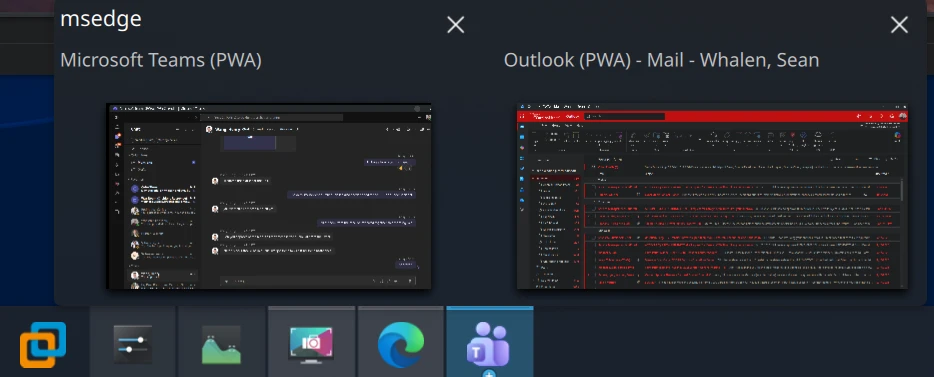
I use Progressive Web Apps (PWAs) in Microsoft Edge for things like Microsoft Teams and Microsoft Outlook to keep track of things at work when I’m on call, even when I’m running Linux to take full advantage of AMD’s ROCm AI framework.
On Windows, Edge PWAs behave like first-class native applications: separate windows, their own taskbar icons, pinnable launchers. Currently, on Linux systems with a Wayland session, the windows from different PWAs currently get improperly grouped — and it turns out the bug is entirely on Microsoft’s side, and it has a one-line fix per app that you can apply yourself.
This post covers the symptom, the root cause, a verified workaround, and why earlier reports claimed the obvious fix “no longer works.”
Symptoms
On Plasma, with the Icons-Only Task Manager set to group by program name:
- Launch one Edge PWA (say, Microsoft Teams). It appears normally.
- Launch a second PWA (say, Microsoft Outlook). Both windows — and every PWA you launch afterward — collapse into a single taskbar group under the first PWA’s icon, identified as
msedge. - Pinned PWA launchers never show as running.
- Pinning a running PWA window and closing it produces a generic page icon that launches the bare Edge browser when clicked.
- Launching a PWA from the application menu briefly shows the launcher’s startup placeholder in the taskbar, which then disappears and is replaced by a separate, unassociated entry.
This isn’t KDE-specific. GNOME users hit the same regression at the same time: a dash-to-dock issue pinned the change to upgrading past Edge 139, and a Flathub issue narrowed it to early September 2025 — noting that Chromium, Brave, and Chrome on the same system were unaffected.
Background: how Wayland matches windows to launchers
On X11, a shell matches a window to its .desktop launcher using the window’s WM_CLASS property. On native Wayland, the equivalent identity is the app_id that the application sets on each toplevel surface. The freedesktop convention is that the app_id should equal the base filename of the application’s .desktop file (similar to a .lnk file in Windows), with the StartupWMClass= key in the .desktop file available as a secondary hint when they differ.
Historically, Edge on Linux ran under XWayland, where this all worked. Then Chromium flipped --ozone-platform-hint to auto by default in the 140 release, meaning Chromium-based browsers now prefer native Wayland when available. Edge 140 inherited that flip in September 2025 — exactly when the grouping reports began.
Root cause: Edge disagrees with itself three ways
For each installed PWA, Edge generates a desktop entry in ~/.local/share/applications/ and tags the PWA’s windows with an app_id. The problem is that Edge writes three mutually inconsistent identifiers, and no two of them match:
| Identifier | Value | Example (Microsoft Outlook) |
|---|---|---|
Window app_id (native Wayland) | msedge-_<appid>-Default | msedge-_lkkahpbimdkjdjjiijflmhaeameegbcm-Default |
| Desktop entry filename | msedge-<appid>-Default | msedge-lkkahpbimdkjdjjiijflmhaeameegbcm-Default |
StartupWMClass= in that file | crx__<appid> | crx__lkkahpbimdkjdjjiijflmhaeameegbcm |
Note the underscore: the window’s app_id has one after msedge-; the filename doesn’t. And crx__<appid> is the legacy X11 WM_CLASS instance name, which matched under XWayland — that’s why everything worked through Edge 139 — but is meaningless once the windows are native Wayland surfaces.
The result: the desktop can’t associate any PWA window with any launcher. It apparently falls back to identifying the orphaned windows by their shared process executable — msedge — which is why every PWA collapses into one group with that label. (I haven’t verified that fallback against the libtaskmanager source, but it matches the observed behavior exactly.)
Since Edge generates all three identifiers itself, this is unambiguously a Microsoft bug. Plasma and GNOME are following the matching rules correctly.
Verifying it on your own system
To see what a window actually calls itself, use KDE’s built-in inspector: System Settings → Window Management → Window Rules → Add New → Detect Window Properties, then click the PWA window. The window class shown is the Wayland app_id. On GNOME, use the Looking Glass debugger instead: press Alt+F2, type lg, press Enter, and read the class from the Windows tab.
To see what Edge wrote to disk:
1
grep -H '^StartupWMClass=' ~/.local/share/applications/msedge-*.desktop
Every value will be in the stale crx__<appid> format.
The fix
Set StartupWMClass= to the window’s actual Wayland app_id. Plasma’s libtaskmanager honors the hint when matching Wayland windows, so no file renames are needed — which matters, because Edge owns these files and renaming them invites duplicate menu entries when Edge regenerates the originals.
For a single app:
1
2
sed -i 's/^StartupWMClass=.*/StartupWMClass=msedge-_lkkahpbimdkjdjjiijflmhaeameegbcm-Default/' \
  ~/.local/share/applications/msedge-lkkahpbimdkjdjjiijflmhaeameegbcm-Default.desktop
For every installed Edge PWA at once:
1
2
3
4
5
6
cd ~/.local/share/applications
for f in msedge-*-Default.desktop; do
  id="${f#msedge-}"
  id="${id%-Default.desktop}"
  sed -i "s/^StartupWMClass=.*/StartupWMClass=msedge-_${id}-Default/" "$f"
done
Already-running PWA windows won’t regroup until relaunched, since the association happens when the window appears. After relaunching, grouping, pinning, closing, and relaunching from the pin all work correctly. The launch-from-menu placeholder dance stops too, because the startup notification is finally adopted by a matching window.
If you had a broken pin from before the fix, remove it and re-pin — it was built from the unmatched window’s metadata and won’t heal itself.
GNOME users: the root cause and fix are identical. GNOME Shell matches windows to launchers using the same identifiers — the window class against the desktop entry basename, with StartupWMClass as a hint — so the same edits should restore separate dash icons and working favorites. I’ve only verified the fix on Plasma, but the GNOME reports of “StartupWMClass edits don’t work” used the stale crx__ values, not the current app_id. To read a window’s class on GNOME, use the Looking Glass debugger: Alt+F2, type lg, Enter, then the Windows tab.
Why earlier reports said StartupWMClass “no longer works”
The September 2025 reports on GNOME (Microsoft Tech Community, Flathub) stated that editing StartupWMClass in the desktop files no longer had any effect. That threw me off initially. The likely explanation: those edits used the old non-underscore or crx_-style values that worked under XWayland, not the current native-Wayland app_id with its msedge-_ prefix and -Default profile suffix. Set the hint to the real app_id and it works.
Credit where due: a fellow Kubuntu user independently found in September 2025 that the window class had grown an underscore relative to the filename, and fixed it by renaming the desktop files. The StartupWMClass edit achieves the same match with less risk of Edge recreating the originals.
Caveats: Edge will undo this for new apps
Two data points from my own system:
- Upgrading Edge (to 150.0.4078.80) did not rewrite my fixed desktop files. The workaround survived the update.
- Installing a new PWA on 150.0.4078.80 generated a fresh desktop file with the same broken
StartupWMClass=crx__<appid>— so the bug is alive and well in current Edge, and any newly installed PWA needs the fix applied. Amusingly, the new PWA initially looked fixed because it opened ungrouped — but only because my other PWAs now matched their own launchers, leaving nothing for the orphan to collapse into. Pinning it exposed the truth immediately.
Individual files may also be regenerated when a PWA’s manifest updates. If grouping breaks for one app after a while, rerun the loop before assuming a new bug.
The suggested fix for Microsoft
This should be a small change to Edge’s desktop-entry generation on Linux: write the Wayland app_id (msedge-_<appid>-<profile>) into StartupWMClass=, or better, make the window app_id match the desktop entry basename per the freedesktop convention. No compositor-side changes are needed — the verified workaround above demonstrates that.
I’ve reported this through Edge’s in-browser feedback tool (Alt+Shift+I) with the full diagnosis. If you’re affected, sending your own feedback referencing the same details is the best way to get it prioritized — the in-browser channel is what reaches the Edge team’s triage.
Bonus: why System Monitor thinks everything is Teams
A related-looking but mechanically distinct oddity: KDE System Monitor’s Applications view listed only Microsoft Teams, with every Edge process — including regular browser windows — attributed to it.
That view doesn’t match windows at all. Plasma spawns each launched application in its own systemd cgroup, and System Monitor’s Applications page groups processes by cgroup, one cgroup per application. Chromium-based browsers are singletons: whichever launcher starts the first Edge process owns the cgroup, and every subsequent PWA or browser window is just an IPC message to that existing process tree. Launch Teams first, and the entire browser lives in the Teams cgroup for the rest of the session. You can confirm with systemd-cgls --user.
Unlike the taskbar bug, this one has no desktop-file fix — it’s a structural consequence of the single-browser-process model colliding with per-cgroup accounting, and it should affect Chrome and Brave identically. It also means End Process on “Microsoft Teams” in System Monitor kills every browser process, PWAs included. Be careful.